 BudgeTrak
The assumption baked into almost every shared-finance product is that combining two people’s money requires combining two people’s bank access. It doesn’t. It requires combining two people’s numbers, which is a much smaller and much less sensitive thing.
This guide is the mechanics: what a shared budget actually needs, what BudgeTrak sends where, and what you give up by not connecting a bank.
A budget needs three inputs. None of them is your bank.
Write down what a budget is actually computing:
- What comes in — your income, and when it lands.
- What is already committed — rent, insurance, subscriptions, savings goals, the annual bill you forget every year.
- What has gone out so far — day-to-day spending since the period began.
That’s it. Given those three, the arithmetic is deterministic. Bank aggregation is a data-entry convenience for input 3. It is not part of the calculation, and it plays no role at all in inputs 1 and 2 — which is exactly where most household budgets actually go wrong.
Put differently: connecting your bank makes logging easier. It does not make your budget more correct. Those are frequently confused.
What “shared” means when there’s no bank in the middle
In an aggregation app, sharing works like this: both partners link their accounts, the aggregator pulls both transaction histories onto a server, and the app renders a joint view. The shared object is a server-side copy of two banking histories.
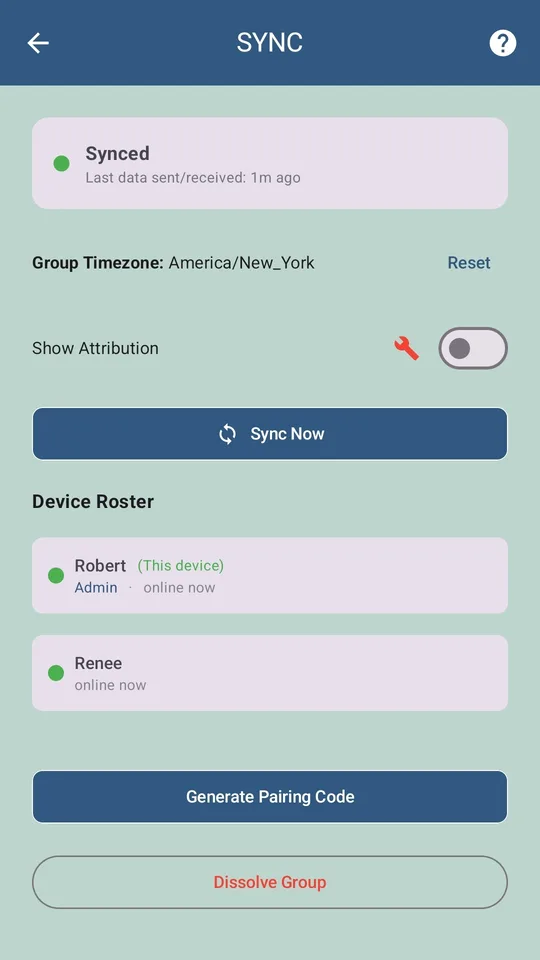
In BudgeTrak, the shared object is the budget document itself — income, bills, goals, transactions — replicated between your own devices. One partner creates a SYNC group; the other joins with a code. Both phones then hold the same budget and update each other in real time.
The difference matters most in the failure case. If our servers were breached tomorrow, what an attacker would hold is ciphertext: the sync payload is encrypted end-to-end, meaning it is encrypted on your device before it leaves and can only be decrypted by the devices in your group. We cannot read it, which also means we cannot recover it for you if every device in the group is lost.
An honest boundary. "End-to-end encrypted" applies to SYNC. It does not mean the app never talks to a network — the optional AI features (receipt scanning, CSV categorisation, the help chat) send what you hand them to be processed, and that's the deal you're making when you use those specific features. Everything in this guide works without touching any of them.
Getting spending in: the three routes
Without a bank feed, transactions arrive one of three ways. Most households end up using two.
1. Log it in the moment
The home-screen widget takes an expense in two taps without opening the app. This sounds like the tedious option and is the one people are most sceptical of, but the actual cost is roughly 40 seconds a day — and it has an underrated side effect: you notice what you’re spending while you spend it, which is most of the behaviour change people are buying a budgeting app for in the first place.
2. Import a statement
Download a CSV from your bank on your own schedule and import it. Duplicate detection catches anything you already logged by hand, and merchant matching learns your regulars. Part of the one-time $9.99 upgrade. This is the “catch up on Sunday” workflow, and for a couple who don’t want to log daily, it works fine.
3. Let your bank’s notifications do the work
If your banking app already sends you a push notification when you tap your card, BudgeTrak can read those notifications on your device and turn them into pending entries — seconds after the purchase, days before it would appear on a statement export.
This is worth being precise about because it sounds like the thing we said we don’t do. It isn’t. There’s no bank login, no third-party connection, and no SMS permission. The app reads notifications your bank is already pushing to your own phone, extracts the amount and merchant, and queues a pending record. You approve it before it touches the budget. Each device sees only its own notification stream. Subscriber tier.
Attribution without surveillance
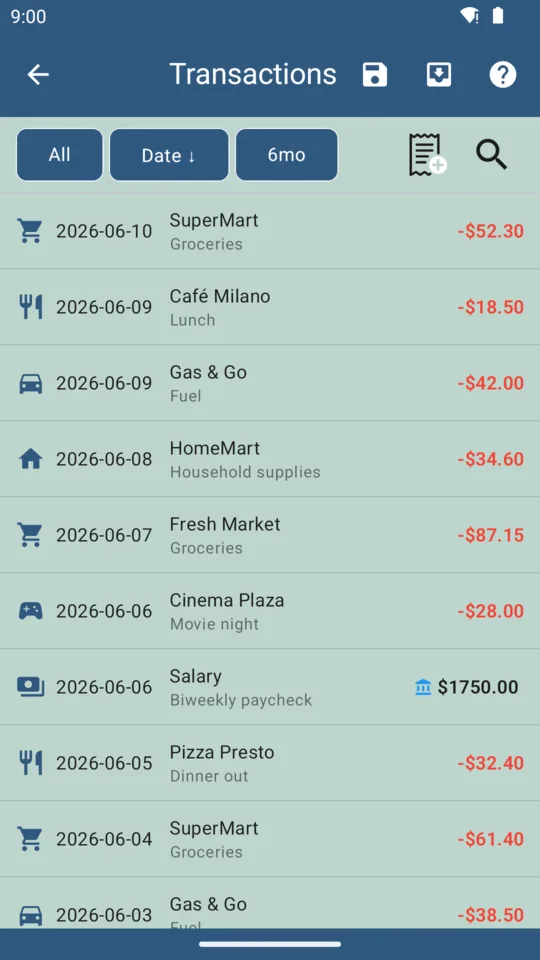
Every transaction records which device logged it. This is deliberately a light touch — it exists so that when the daily number drops by $80, either of you can see why without asking. It is not a monitoring feature, and there’s no per-person spending league table, because that’s a different product and usually a worse relationship.
What you actually give up
Three things, stated plainly:
- Automatic capture of every transaction, everywhere. Notification capture covers cards that send alerts. Cash, and banks that don’t notify, still need logging or importing.
- Retroactive history on day one. An aggregator can pull twelve months of past transactions the moment you connect. You’d start with a CSV import instead.
- Balance reconciliation against your bank. BudgeTrak tracks the budget you told it about, not your literal account balance. If those drift, you reconcile at import time.
If those three are dealbreakers, an aggregation app is genuinely the better tool and you should use one. If they’re an acceptable price for nobody holding your bank credentials, this works.
Setting it up together
Fifteen minutes, once, on one phone:
- Enter income — including the irregular kind; the engine handles variable pay and clustered bills.
- Enter recurring bills with their real due dates.
- Add savings goals, and anything large you’re spreading over months.
- Turn on SYNC, and have your partner join with the code.
From there you both watch the same daily number. The first week is usually uncomfortable, because the number is smaller than the bank balance you’d both been using. That gap is the point — it’s the commitments you’d been spending twice.
Frequently asked questions
Can you share a budget without linking bank accounts?
Yes. A budget needs three inputs — income, recurring commitments, and spending — none of which require bank access. BudgeTrak syncs those three things directly between your devices with end-to-end encryption, so no bank connection exists at any point.
What data actually gets synced between partners?
Your budget: income, recurring bills, savings goals, categories, and transactions, each attributed to the device that logged it. It is encrypted end-to-end, which means it is unreadable in transit and unreadable at rest on our servers.
Can my partner see my individual bank account?
No, because BudgeTrak has no access to anyone’s bank account. Partners see the shared household budget and the transactions logged into it — nothing more.
Is a shared budget without bank sync more work?
Somewhat. Expect roughly a minute a day of logging, or a weekly CSV import. If your bank sends purchase notifications, the Subscriber tier can convert those into pending entries automatically, which removes most of the manual work.
How many people can share one budget?
Up to five devices in one SYNC group. One person subscribes at $4.99/month; everyone else joins free.
Try BudgeTrak free
No bank login. No ads on paid tiers. Works on Android today.
Get it on Google Play