 BudgeTrak
Nearly every budgeting app now opens with the same screen: connect your bank to get started. It’s presented as setup, not as a choice, and the implication is that budgeting simply requires it.
It doesn’t. A budget is arithmetic over three inputs — income, commitments, and spending — and your bank is a delivery mechanism for exactly one of them.
This guide is for people who’d rather not make that trade, and who want an honest account of what it costs.
What you’re actually agreeing to
When an app connects to your bank, one of two things happens. Either you type your online banking username and password into a third-party aggregator, or you grant ongoing read access through a bank portal.
Both end in the same place: a company that is not your bank holds durable, revocable-in-theory access to your complete transaction history. Not a summary. Every line — where you shop, what you treat, who you pay, when you travelled, which pharmacy, which lawyer.
The mainstream aggregators are not cavalier about this, and bank-sanctioned access is meaningfully better than password sharing. But notice the shape of the trade. You are handing over the most detailed behavioural record most people generate, and receiving in return… automatic data entry.
That can absolutely be worth it. It’s just worth deciding, rather than clicking through as though it were a system requirement.
What a budget genuinely needs
Three inputs:
- Income — how much, how often. You know this. Your bank doesn’t tell you anything you can’t state in two minutes, and for irregular income it’s often worse than you at guessing.
- Commitments — rent, insurance, subscriptions, the annual bills. A bank feed is actively bad at these: it sees last month’s rent as history, not as next month’s obligation. You have to tell any app about these regardless.
- Spending — what’s gone out since the period started. This is the only input a bank feed helps with.
So bank aggregation automates one input out of three, and it’s the one with the most alternatives.
What we do and don't claim. BudgeTrak has no bank connection and asks for no banking credentials — that's absolute. It is not an offline-only app: encrypted SYNC moves budget data between your own devices, and the optional AI features process what you submit to them. The claim is specific and worth stating precisely: no company, us included, is reading your bank account.
Three ways to keep a budget current without a feed
1. Log as you spend
Two taps from a home-screen widget without opening the app. Realistically about 40 seconds a day.
The obvious objection is that it’s work. The non-obvious counterpoint: the friction is doing something. Logging a purchase at the moment you make it is a small act of attention, and a substantial share of what people actually want from a budgeting app — spending less without deciding to — comes from that attention rather than from any report. Fully automated capture is more comfortable and noticeably less effective at changing behaviour.
2. Import a statement
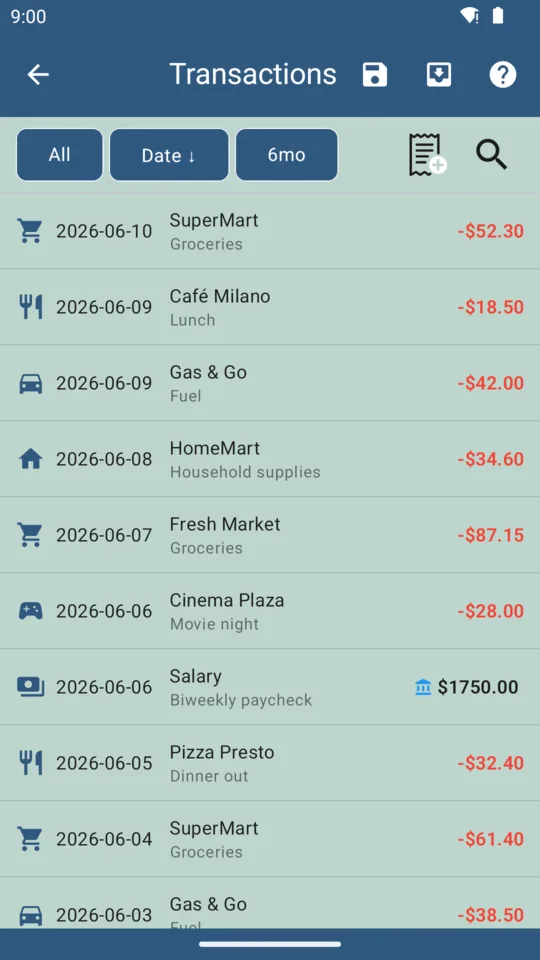
Download a CSV from your bank whenever suits — weekly, monthly, after a holiday — and import it. Duplicate detection reconciles against anything you already logged by hand; merchant matching learns your regulars; optional AI categorisation sorts the rest.
You get most of the completeness of a feed with none of the standing access, because you fetch the file, once, and nothing is connected afterwards. Part of the one-time $9.99 upgrade.
3. Use the notifications your bank already sends you
If your banking app pushes you an alert when you tap your card, that alert already contains the merchant and the amount. BudgeTrak can read those notifications on your device and convert them into pending entries within seconds of the purchase — days before the transaction would appear in a statement export.
Worth being precise, because this is the part people assume must involve a bank connection: there is none. No bank login, no aggregator, no SMS permission. The app reads notifications your bank is already sending to your own phone, extracts the amount and merchant, and queues a pending record that you approve before it touches your budget. Each device sees only its own notification stream. Subscriber tier.
For most people this closes the majority of the gap between manual logging and a bank feed.
The honest costs
Three, and you should weigh them properly rather than take our word for it:
- Cash and non-notifying accounts still need logging. Notification capture only covers cards whose bank sends alerts.
- No instant back-history. An aggregator can pull twelve months the moment you connect. You’d import a CSV to get the same thing, which takes a few minutes.
- No automatic balance reconciliation. BudgeTrak tracks the budget you described, not your literal account balance. If the two drift, you reconcile when you next import.
If those are unacceptable, use an aggregating app — genuinely, it’s the better tool for that preference, and a budget you actually maintain beats a principled one you abandon.
What you get back
- No third party holds your transaction history, because no third party has access to it.
- Nothing to breach. There’s no aggregated store of your bank data to leak, because it was never collected.
- No connection to break. Bank feeds fail constantly — re-authentication loops, changed portals, silently stalled syncs. A budget with no feed has no feed to break.
- It works from minute one, with no account. The free tier needs no sign-up at all.
Starting from scratch
Fifteen minutes:
- Enter your income, including the irregular parts.
- Enter recurring bills with their real due dates — this is where the accuracy comes from.
- Add savings goals and anything you’re spreading over months.
- Pick your capture method: log, import, or notifications.
Then look at the daily figure. If it’s lower than you expected, that’s the safe-to-spend calculation subtracting commitments you’d been carrying invisibly — which is the entire reason to do this.
Frequently asked questions
Is there a budgeting app that doesn't require linking your bank?
Yes. BudgeTrak never asks for bank credentials and has no bank connection at all. You enter income and recurring bills once, and day-to-day spending arrives by manual logging, CSV import, or by reading your bank’s own purchase notifications on your phone.
Is it safe to link your bank account to a budgeting app?
Mainstream aggregators use bank-sanctioned access and are not reckless, but the risk is structural rather than about any one company’s competence: a third party holds durable read access to your complete transaction history, and that access outlives your interest in the app. Avoiding it entirely removes the risk class.
How do you track spending without a bank feed?
Three ways, and most people combine two. Log purchases as you make them, usually under a minute a day. Import a CSV statement from your bank on your own schedule. Or let the app read the purchase notifications your banking app already sends to your phone and turn them into pending entries you approve.
What do you lose by not connecting a bank?
Three things: automatic capture of every transaction everywhere, an instant twelve-month history on day one, and automatic reconciliation against your real account balance. If those are dealbreakers, an aggregating app is the better tool.
Does BudgeTrak work offline?
The budgeting engine runs on your device, so it keeps working without a connection. Optional features — encrypted SYNC between your devices, and the AI receipt and categorisation tools — need a network when you use them.
Try BudgeTrak free
No bank login. No ads on paid tiers. Works on Android today.
Get it on Google Play