 BudgeTrak
A two-person budget has one failure mode: you both spend against the same money. A five-person household has that failure mode plus a harder one — most of the people spending the money are not the person maintaining the budget.
The teenager who spends $30 on the way home from school is not being careless. They genuinely do not have the information. Nobody does, in most households, because the budget lives in one person’s head or one person’s spreadsheet.
What changes when a budget goes household-wide
Three requirements get sharper as you add people.
The number must be live, not published. A budget your family sees on Sunday is a report. By Wednesday everyone is spending against a figure that has already moved. With five people, stale data compounds fast — three people can each spend “the last $60” of the same $60.
Every entry needs an author. Not for blame. For arithmetic hygiene. When the household number drops, someone will ask why, and “I don’t know, it just did” is how families stop trusting the app and go back to the bank balance.
One person pays; everyone participates. If the app charges per seat, families quietly under-license — two people on the app, three spending off-book — and the budget is wrong by construction.
How it works across five phones
One person sets the household budget up: income (all of it, from however many earners), recurring bills with real due dates, savings goals, and anything large being spread across months. The engine turns that into one daily figure — what the household can spend today without breaking a commitment already made.
Then that person creates a SYNC group and shares a join code. Up to four more devices join, free. From then on all five phones hold the same budget and update each other in real time, encrypted end-to-end.
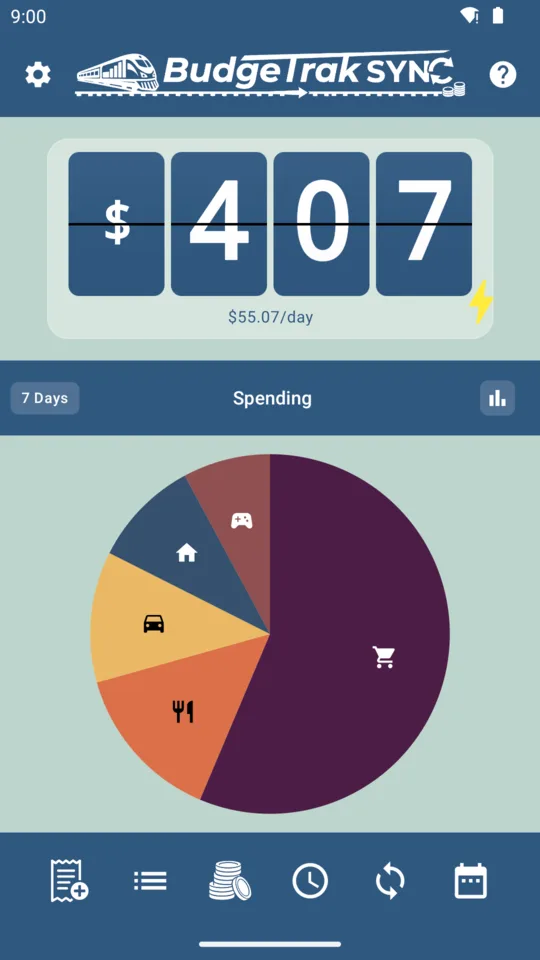
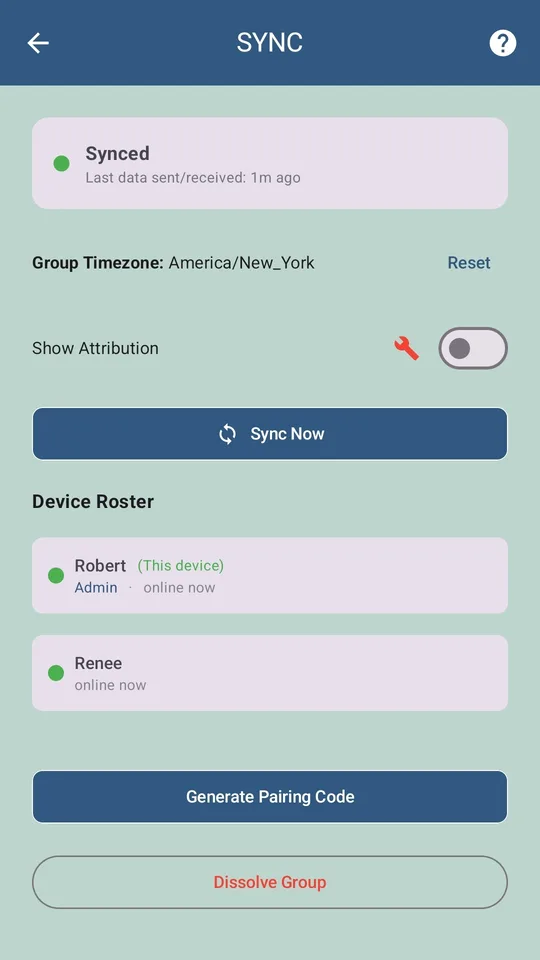
The practical effect is smaller than it sounds and better than it sounds. Nobody has to be taught the budget. The number is on everyone’s phone, already correct, already accounting for the fact that the car insurance renews on the 12th.
The teenager question
Be clear-eyed about this: a SYNC group is one shared document. Everyone in it sees the household’s income, bills, goals, and full transaction list. There is no partial view, no per-member permission tier, no “child mode.”
So there are two sensible configurations:
- Include them. Appropriate when you’re comfortable with a 16-year-old seeing what the household earns and owes. Many families find this is the single most effective financial-literacy intervention available to them — abstract lectures about budgeting do very little; watching the daily number move because of something you personally bought does a great deal.
- Don’t. Keep the group to the adults and log the rest of the household’s spending yourself. Perfectly reasonable, and how most families start.
What you should not do is include someone and then be annoyed they can see things. The app will not hide it.
Bills, and who gets nagged
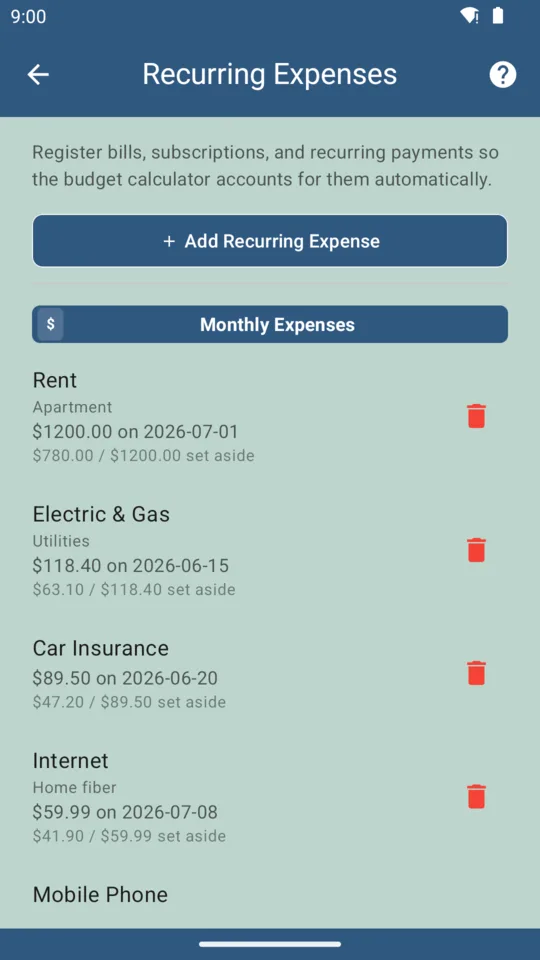
Recurring bills carry per-bill notification settings with a custom lead time. That means the person who actually pays the water bill gets the reminder, and the rest of the household doesn’t develop notification blindness from alerts that aren’t theirs. It’s a small feature that quietly determines whether a family keeps using an app after month two.
Planning for the expensive months
Households don’t spend evenly. School fees, car registration, the holidays, the boiler that fails in February — these are what turn a working budget into a failed one.
Two features exist specifically for this:
- Savings goals let you save toward a known future purchase. The daily number shrinks by the right amount now, so the purchase is survivable later.
- Amortisation does the opposite: take an expense that already happened and spread its cost across coming months, so one bad week doesn’t declare the whole month a write-off.
Either way the daily figure stays honest. That’s the design goal — a number you can spend to zero without consequences, because the consequences were subtracted in advance.
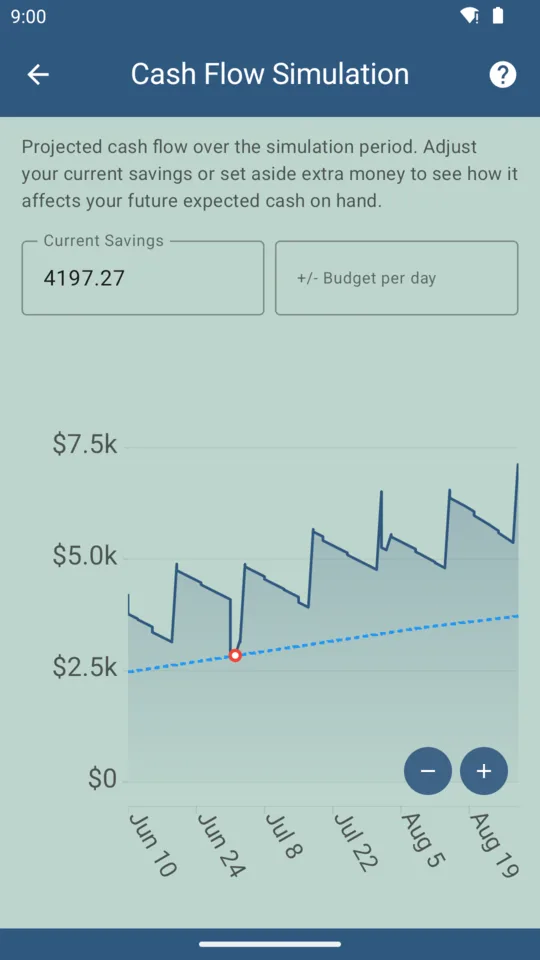
For the bigger picture, the cash-flow simulation projects up to 18 months forward and shows where the household runs tight before it does. It’s part of the one-time $9.99 upgrade.
Household cost
| Cost | Who needs it | |
|---|---|---|
| Free tier | $0 forever | Every member who joins a group |
| Subscriber | $4.99 / month | One person — creates and administers SYNC |
| Paid unlock | $9.99 once | Optional: CSV import, reports, simulation, ad-free |
A five-person household on one $4.99 subscription is $1 per person per month, and four of those five never see a payment screen.
Where this doesn’t fit
- Mixed Android/iPhone households. Android only today; iOS is unreleased. If half your family is on iPhone, this won’t work for you yet, and that’s a hard stop rather than an inconvenience.
- More than five devices. The group cap is five.
- Separate budgets under one roof. This is one shared household budget. Adult children who want their own independent budget should run their own — the free tier is genuinely free and needs no account.
Frequently asked questions
What is the best budgeting app for a family?
For a family the requirements are stricter than for one person: everyone needs the same live number, every entry needs to say who made it, and it should not require handing bank credentials to a third party. BudgeTrak SYNC covers up to five devices on one budget, with one paid Subscriber seat and free joins for everyone else.
How many family members can share one budget?
Five devices per SYNC group. That is typically two parents plus up to three children, or two households coordinating on a shared commitment.
Can teenagers log spending without seeing everything?
Everyone in a SYNC group sees the same shared budget — it is one document, not per-person views. If a family member should not see the household totals, keep them out of the group and have a parent log their spending.
Does everyone need to pay?
No. One person holds the $4.99/month Subscriber tier to create and administer the group. Every other member joins on the free tier at no cost.
Who gets the bill reminders?
Whoever you choose. Bill due-date notifications are per-bill and per-device, so the person who actually pays the electricity bill gets that alert instead of the whole household being pinged.
Try BudgeTrak free
No bank login. No ads on paid tiers. Works on Android today.
Get it on Google Play